
Introduction
When I first started integrating LLMs into my workflows at ajmani.dev, I made the classic mistake: I treated the model like a slightly smarter version of Google. I’d throw a vague question at it and get frustrated when the output was inconsistent or riddled with hallucinations. It took me a few weeks of trial and error to realize that interacting with an LLM isn’t just ‘chatting’—it’s a new form of programming.
This beginner guide to prompt engineering for developers is designed to move you past the trial-and-error phase. We aren’t just looking for ‘hacks’ to get a cool response; we are looking for deterministic, repeatable, and scalable ways to use Large Language Models (LLMs) as components in our software stack. Whether you are building a simple CLI tool or a complex RAG system, mastering these fundamentals is the first step toward reliable AI integration.
Core Concepts: The Developer’s Mental Model
To be effective, you need to stop viewing the prompt as a message and start viewing it as a function call. In traditional programming, you have inputs, logic, and outputs. In prompt engineering, your ‘logic’ is the natural language instructions you provide.
- Zero-Shot Prompting: Asking the model to perform a task without any examples. Useful for simple sentiment analysis or summarization.
- Few-Shot Prompting: Providing a few pairs of inputs and desired outputs within the prompt. This is often the fastest way to how to reduce hallucination in ai applications by anchoring the model’s behavior.
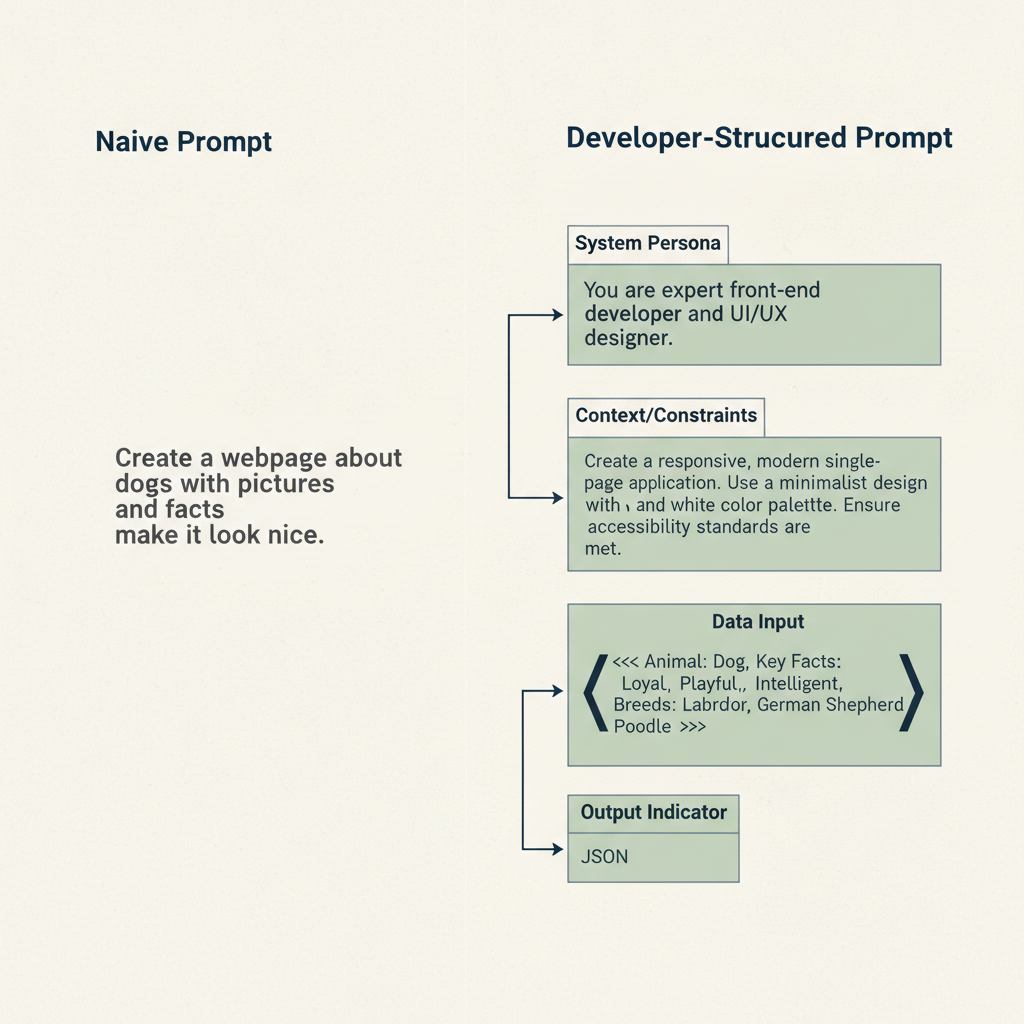
- System Prompts: The high-level instructions that define the ‘persona’ and constraints of the model (e.g., “You are a senior DevOps engineer who only responds in JSON”).
- Delimiters: Using specific characters like
""",###, or<tag>to separate instructions from the data the model needs to process.
Getting Started: Setting Up Your Lab
Before writing a single line of code, you need an environment where you can iterate quickly. While ChatGPT is fine for casual use, developers should use the OpenAI Playground or Anthropic Console. These tools allow you to adjust ‘Temperature’ (randomness) and ‘Top-P’ (diversity), which are critical for consistency.
In my experience, keeping Temperature low (around 0.2 to 0.3) is essential when you need the model to follow a strict format. If you’re generating creative content, you can bump it up to 0.7 or higher. Once you’ve honed a prompt in the playground, you can export the logic into your application code.
Your First Project: A Structured Data Extractor
Let’s build something practical. Suppose you have a pile of unformatted bug reports and you want to turn them into structured JSON. This is a perfect use case for a developer-focused prompt.
import openai

def extract_bug_data(report_text):
    system_prompt = """
    You are a technical triaging assistant.
    Extract the 'component', 'severity', and 'repro_steps' from the user input.
    Return ONLY valid JSON.
    """

    user_prompt = f"Extract data from this report: ```{report_text}```"

    # API call logic goes here
    # As seen in the diagram below, structure is key to getting valid JSON.
By wrapping the report_text in triple backticks, you prevent the model from getting confused if the bug report itself contains instructions (a common security risk known as ‘prompt injection’).
Common Mistakes to Avoid
Even seasoned developers fall into these traps when they start out:
- Being too polite: You don’t need to say ‘please’ or ‘thank you.’ Instead, use imperative verbs like ‘Summarize,’ ‘Extract,’ or ‘Rewrite.’
- Vague constraints: Instead of saying “don’t make it too long,” say “keep the response under 50 words.”
- Ignoring output format: Always specify the format. If you need JSON, provide a schema. If you don’t, you’ll spend half your time writing regex to clean up the model’s conversational filler.
- Skipping evaluation: You wouldn’t ship code without tests. Use evaluating ai accuracy best practices to ensure your prompts work across different datasets.
The Learning Path: Moving to Intermediate
Once you’ve mastered basic prompting, the next step is Chain-of-Thought (CoT). This involves asking the model to “think step-by-step.” For complex logic or math, this significantly improves accuracy because it forces the model to generate intermediate reasoning tokens before reaching a conclusion.
Eventually, you’ll hit the limits of what a prompt can do. That’s when you should look into best practices for fine-tuning small language models for specific domains or implementing Retrieval-Augmented Generation (RAG) to give the model access to your private documentation.
Essential Tools for Developers
To level up your workflow, I recommend checking out these tools:
| Tool | Use Case |
|---|---|
| Promptfoo | Testing and evaluating prompt quality locally. |
| LangChain / LlamaIndex | Frameworks for chaining prompts together. |
| Helicone | Observability and logging for your LLM API calls. |
If you’re serious about building production-grade AI, you should also understand the underlying security. Check out my guide on mastering API authentication for devs to keep your LLM keys safe.
Beginner Guide to Prompt Engineering for Developers: Conclusion
Prompt engineering is the ‘new’ software engineering, but the old rules still apply: be precise, test your edge cases, and iterate constantly. By following this beginner guide to prompt engineering for developers, you’re not just getting better answers from a bot—you’re building the skills necessary to lead the next generation of software development.
Official resources for Prompt Engineering for Developers
Documentation and references for Prompt Engineering for Developers:
