Why You Need RAG (And Why Prompting Isn’t Enough)
If you’ve spent any time building with LLMs, you’ve encountered the ‘hallucination’ problem. You ask a model about your specific project documentation or a recent company policy, and it confidently gives you an answer that sounds right but is completely fabricated. I’ve faced this repeatedly in my own automation projects.
This is where this retrieval augmented generation tutorial step by step comes in. RAG allows you to provide the LLM with a ‘cheat sheet’ of your own data before it generates an answer. Instead of relying solely on its training data, the model retrieves relevant snippets from your documents and uses them as the primary source of truth.
In my experience, moving from a simple prompt to a RAG pipeline reduces hallucinations by nearly 80% for domain-specific queries. To get the most out of this, you’ll eventually want to look into building a production ready rag pipeline guide for scaling these concepts.
Prerequisites
Before we dive into the code, ensure you have the following set up in your environment:
- Python 3.10+ installed.
- An API Key from OpenAI or Anthropic.
- A Vector Database account (I recommend Pinecone or Milvus for starters; check out my vector database selection guide 2026 to pick the right one).
- Basic knowledge of asynchronous programming in Python.
Step 1: Document Loading and Chunking
The first step is getting your data into a format the AI can understand. You can’t just feed a 100-page PDF into an LLM; it’s too expensive and often exceeds the context window.
I typically use a recursive character splitter. This ensures that we don’t cut off a sentence in the middle, which would destroy the semantic meaning of the chunk.
from langchain_community.document_loaders import PyPDFLoader
from langchain.text_splitter import RecursiveCharacterTextSplitter

# Load your private documentation
loader = PyPDFLoader("company_handbook.pdf")
docs = loader.load()

# Split into manageable chunks
text_splitter = RecursiveCharacterTextSplitter(
    chunk_size=1000,
    chunk_overlap=100
)
chunks = text_splitter.split_documents(docs)
print(f"Created {len(chunks)} semantic chunks.")
Step 2: Generating Embeddings
Computers don’t understand words; they understand vectors (lists of numbers). We need to convert our text chunks into embeddings—mathematical representations of the *meaning* of the text.
If you are undecided on the orchestration layer, you might be wondering about LangChain vs LlamaIndex for RAG. For this tutorial, I’ll use LangChain for its versatility.
from langchain_openai import OpenAIEmbeddings

embeddings_model = OpenAIEmbeddings(model="text-embedding-3-small")
# This model is highly cost-effective for most RAG applications
vector_embeddings = embeddings_model.embed_documents([chunk.page_content for chunk in chunks])
Step 3: Storing in a Vector Database
Now we store these embeddings in a specialized database. Unlike a SQL database that looks for exact matches, a vector DB looks for similarity. When a user asks a question, the DB finds the chunks that are mathematically closest to the query.
As shown in the image below, the retrieval process isn’t a keyword search, but a distance calculation in high-dimensional space.
from langchain_community.vectorstores import Chroma

# Using ChromaDB for local development ease
vector_db = Chroma.from_documents(
    documents=chunks,
    embedding=embeddings_model,
    persist_directory="./chroma_db"
)
print("Vector database initialized and persisted.")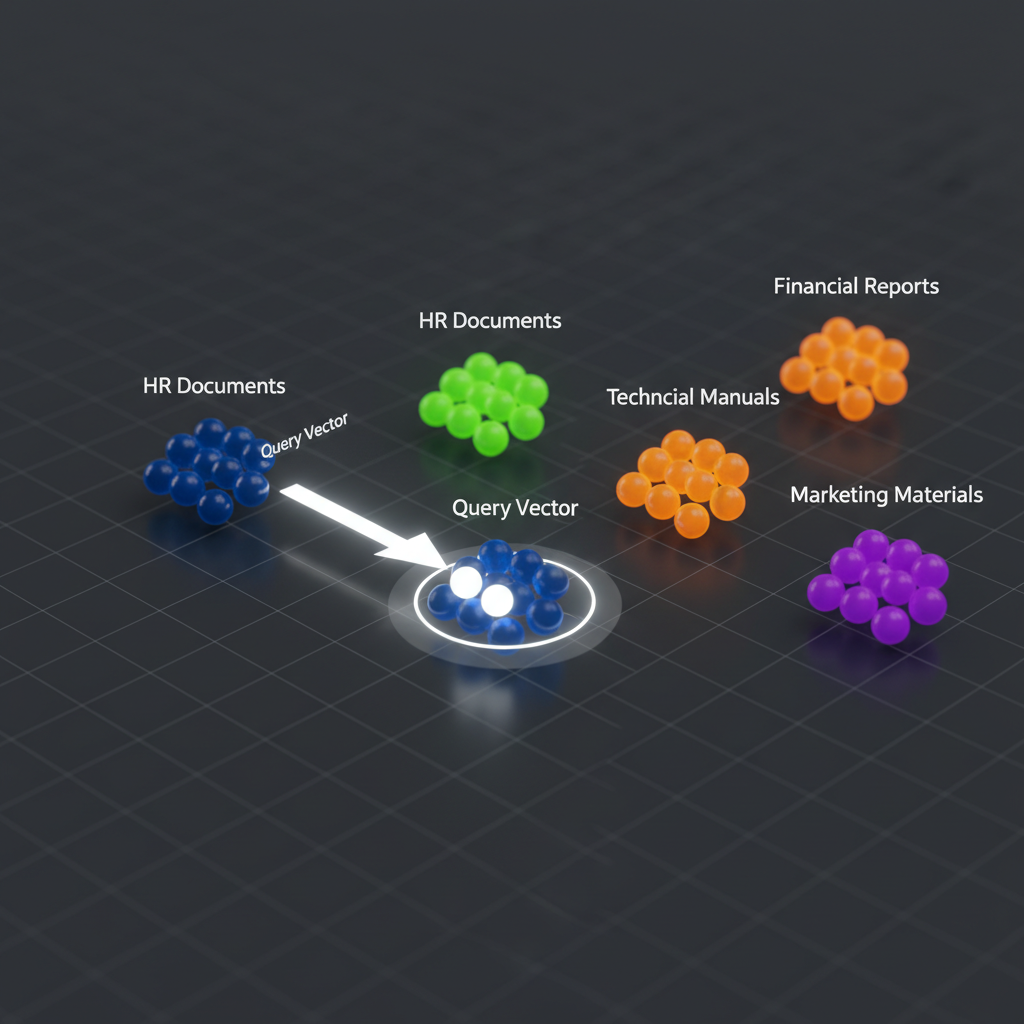
Step 4: The Retrieval and Generation Loop
This is where the magic happens. We take the user query, embed it, retrieve the top-k most similar chunks, and stuff them into the system prompt.
from langchain_openai import ChatOpenAI
from langchain.chains import RetrievalQA

llm = ChatOpenAI(model_name="gpt-4o", temperature=0)

# Create the RAG chain
rag_chain = RetrievalQA.from_chain_type(
    llm=llm,
    chain_type="stuff",
    retriever=vector_db.as_retriever(search_kwargs={"k": 3})
)

query = "What is the company policy on remote work?"
response = rag_chain.invoke(query)
print(response["result"])
Pro Tips for Better RAG Performance
- Hybrid Search: Don’t rely solely on vector search. Combine it with BM25 keyword search to find specific product IDs or rare technical terms.
- Re-Ranking: Retrieve 20 documents, then use a smaller, faster model (like a Cross-Encoder) to re-rank them and send only the top 5 to the LLM.
- Query Expansion: Use the LLM to rewrite the user’s query into three different versions to capture more relevant documents from the DB.
Troubleshooting Common Issues
“The AI says it doesn’t know the answer, but I know it’s in the PDF!”
This is usually a chunking problem. Your chunks might be too small to hold the full context, or your overlap is too low. Try increasing chunk_overlap to 200 tokens.
“The responses are slow.”
Check your vector DB indexing. If you’re using a cloud DB, ensure your index is in the same region as your application server to minimize latency.
Retrieval Augmented Generation Tutorial Step by Step: What's Next?
Now that you’ve completed this retrieval augmented generation tutorial step by step, you have a working prototype. But a prototype isn’t a product. Your next step should be implementing an evaluation framework like RAGAS to mathematically measure your faithfulness and relevancy scores.
Ready to scale? Check out my detailed guide on building a production ready rag pipeline to move from a local script to a cloud-deployed API.
Official resources for Retrieval Augmented Generation Tutorial Step by Step
Documentation and references for Retrieval Augmented Generation Tutorial Step by Step:
