
Introduction: Why Your Choice of IDE Matters
In my decade of building backend systems, I’ve learned that choosing the best ide for spring boot development isn’t just about syntax highlighting; it’s about how much the tool gets out of your way. As we move deeper into 2026, the ecosystem has shifted. We aren’t just writing boilerplate anymore; we are managing microservices, cloud-native deployments, and AI-assisted refactoring.
Whether you are following my spring boot for beginners introduction or you are an architect managing a complex mesh of services, your IDE is your cockpit. After testing the latest updates to IntelliJ IDEA, VS Code, and Eclipse-based STS, I’ve broken down which tool actually boosts your velocity.
1. IntelliJ IDEA Ultimate: The Gold Standard
For most professional developers, IntelliJ IDEA Ultimate remains the undisputed champion. While the Community Edition is capable, the Ultimate version offers deep integration specifically for the Spring framework that others simply haven’t matched yet.
Strengths (Pros)
- Advanced Autocomplete: It doesn’t just suggest classes; it understands Spring-specific contexts like
@Valueproperties and Bean injections. - Spring Dashboard: A dedicated view to manage your running services, see active profiles, and monitor health endpoints.
- Database Tools: Built-in DataGrip features mean you can query your H2 or PostgreSQL databases without leaving the IDE.
- Smart Navigation: Navigating from a Controller method to its corresponding
application.propertiesentry or Thymeleaf template is instantaneous. - AI Integration: The JetBrains AI Assistant has become remarkably good at generating Spring Security configurations and boilerplate tests.
- HTTP Client: The built-in
.httpfile support allows for version-controlled API testing directly in the editor.
Weaknesses (Cons)
- Resource Heavy: It remains a memory hog. I recommend at least 32GB of RAM for smooth multi-service development.
- Cost: Unlike its competitors, the full Spring features require a paid subscription.
- Complexity: The sheer volume of features can be overwhelming for those just starting with a spring boot for beginners introduction.
2. Visual Studio Code: The Lightweight Contender
Once considered a “text editor,” VS Code has evolved into a serious environment for Java. By using the “Spring Boot Extension Pack,” it has become a legitimate contender for the title of best ide for spring boot development for developers who prefer a modular setup.
Strengths (Pros)
- Speed: It starts up in seconds, whereas IntelliJ might take a minute to index large projects.
- Remote Development: The SSH and Container extensions are superior for developing inside Docker environments.
- Free: You get a professional-grade experience without the Ultimate price tag.
Weaknesses (Cons)
- Fragmented Setup: You have to manage multiple extensions (Java, Maven, Spring) which can occasionally conflict.
- Refactoring Limits: It lacks the deep, multi-file structural refactoring safety that IntelliJ provides.
Pricing Comparison
| IDE | License | Approx. Cost (Annual) |
|---|---|---|
| IntelliJ IDEA Ultimate | Subscription | $169 – $649 |
| VS Code | Open Source/Free | $0 |
| Spring Tool Suite (STS) | Open Source/Free | $0 |
Performance & User Experience
In my experience, performance is a tale of two metrics: startup time and indexing speed. VS Code wins on startup, but IntelliJ wins on developer throughput. When you are applying spring boot productivity tips like hot swapping and live reload, the tight integration in IntelliJ makes the feedback loop significantly shorter.
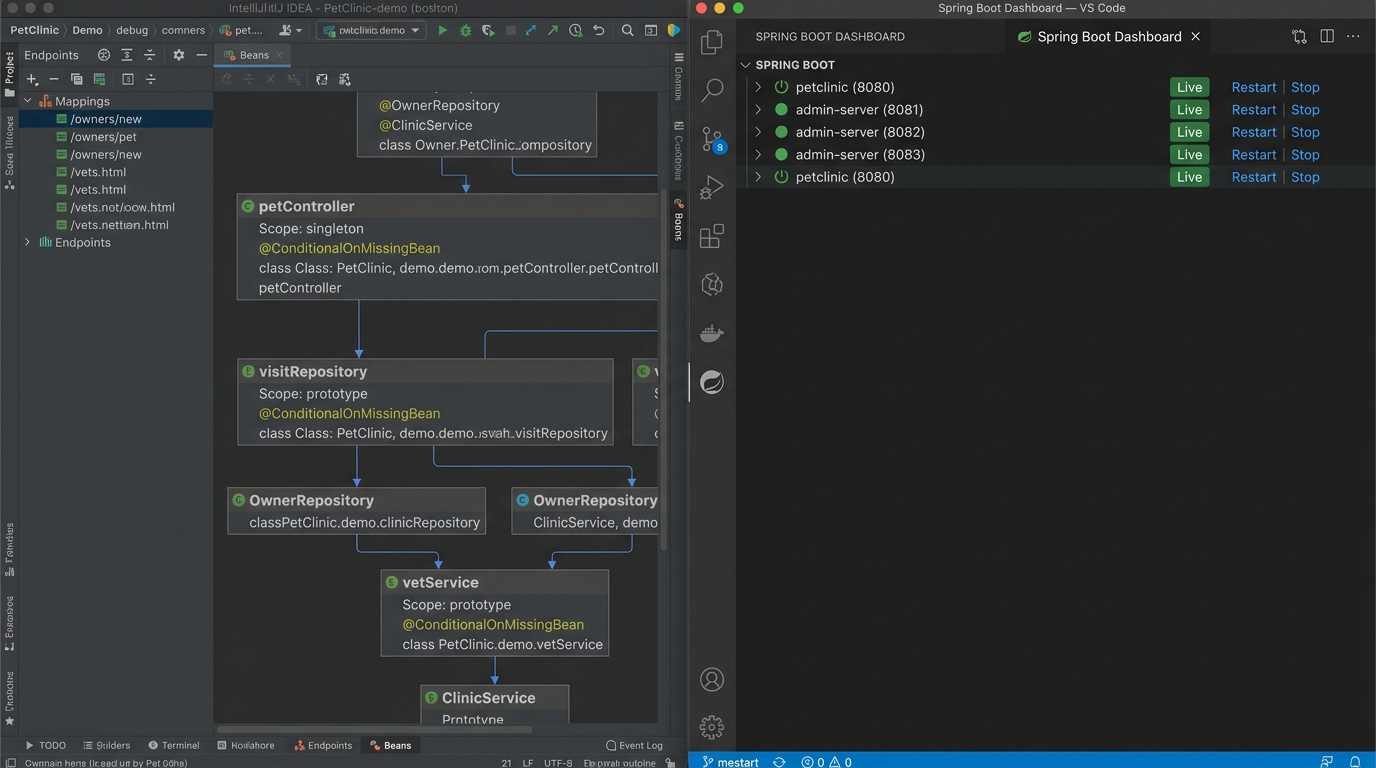
As shown in the comparison below, the visual depth of Spring Beans in IntelliJ provides a level of clarity that Eclipse or VS Code still struggles to replicate with their plugin-based approach.
Who Should Use What?
- Enterprise Developers: Stick with IntelliJ IDEA Ultimate. The time saved in navigation and debugging easily justifies the license cost.
- Open Source Contributors: VS Code is excellent for its lightweight nature and great Git integration.
- Legacy System Maintainers: Spring Tool Suite (STS) remains relevant for those working on older monolithic apps that rely heavily on Eclipse-specific tooling.
Best IDE for Spring Boot Development: Final Verdict
The best ide for spring boot development in 2026 is still IntelliJ IDEA Ultimate. While VS Code is an amazing secondary tool for quick edits or remote work, the depth of the Spring-specific ecosystem in IntelliJ is unmatched. If you are serious about backend engineering, it’s an investment in your own sanity. For more ways to optimize your workflow, check out my latest spring boot productivity tips to get the most out of your chosen environment.
More on this topic: IDEs, Git clients and database GUIs, every comparison and guide in one place.
Official resources for Best IDE for Spring Boot Development
Documentation and references for Best IDE for Spring Boot Development:
