For years, the industry has pushed us toward the ‘Single Page Application’ (SPA) obsession. But if you’re building a side project, a prototype, or a small internal tool, dragging in React or Vue often feels like using a sledgehammer to crack a nut. Lately, I’ve been moving toward a ‘low-JS’ philosophy, and that’s where the debate of htmx vs Alpine.js for small projects comes into play.
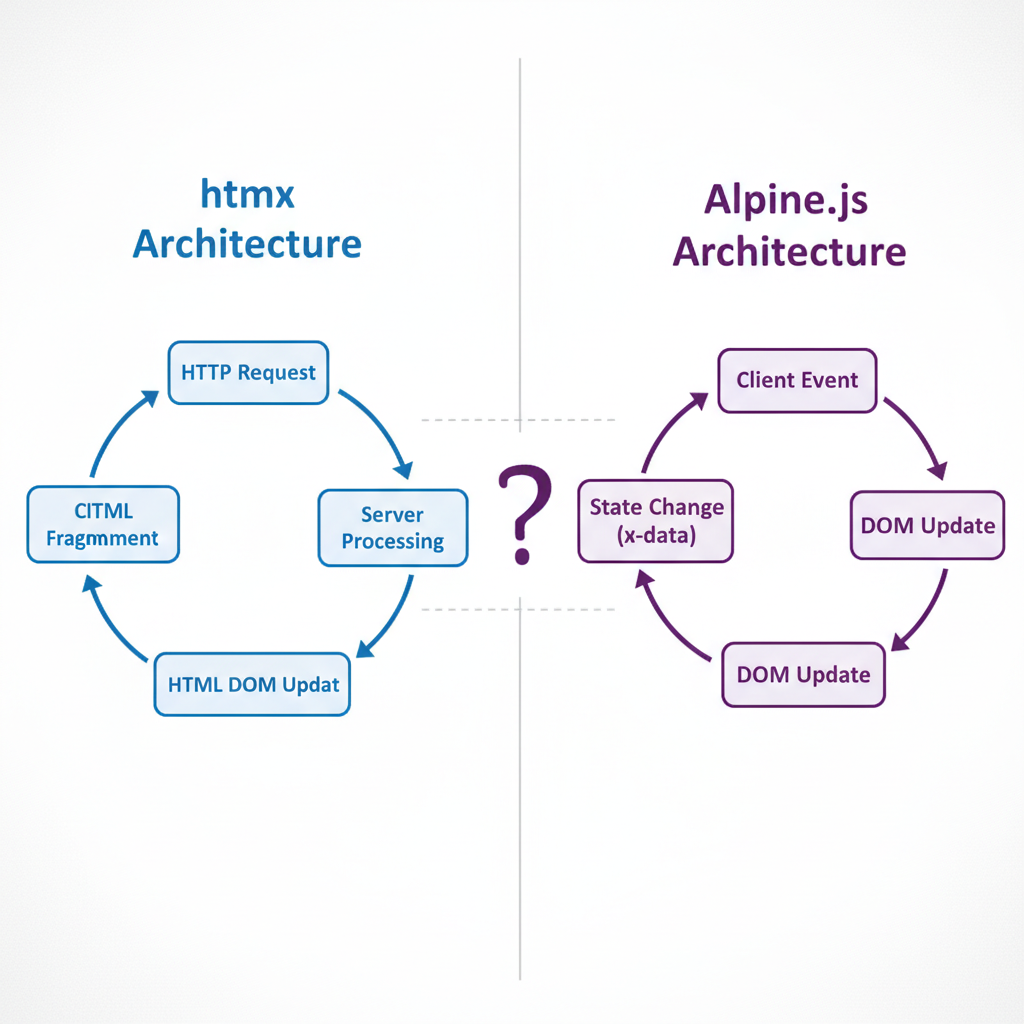
The first thing to understand is that these two aren’t actually competitors—they solve fundamentally different problems. In my experience, the confusion arises because both allow you to add interactivity directly into your HTML. However, htmx is about communication (server-to-client), while Alpine.js is about behavior (client-side state).
What is htmx? The Power of Hypermedia
htmx allows you to access AJAX, CSS Transitions, WebSockets, and Server Sent Events directly in HTML using attributes. Instead of writing JavaScript to fetch JSON and then rendering it into a template on the frontend, htmx asks the server to send HTML fragments.
I recently used htmx for a small inventory tracker. Instead of a complex API layer, my server just returned the specific piece of HTML needed to update a table row. It felt like returning to the simplicity of the early web, but with modern speed.
Pros of htmx
- Reduced JS Bundle: You barely write any custom JavaScript.
- Server-Side Simplicity: Your business logic stays on the server.
- Faster Iteration: No need to maintain separate API endpoints and frontend state mirrors.
- Low Cognitive Load: If you know HTML, you basically know htmx.
- Great for CRUD: Perfect for dashboards and data-heavy small projects.
Cons of htmx
- Server Dependency: Every interaction requires a network round-trip.
- Limited Client-Side Logic: Not suitable for highly interactive UI (like a drag-and-drop builder).
- Backend Requirement: Your server must be able to return HTML fragments, not just JSON.
What is Alpine.js? The Modern jQuery
Alpine.js is a rugged, minimal framework for composing behavior directly in your markup. Think of it as Tailwind CSS, but for JavaScript. It provides the reactivity of Vue or React but without the build step or the complex boilerplate.
When I need a dropdown menu, a modal, or a tabbed interface that doesn’t need to talk to the server immediately, I reach for Alpine. It manages local state (like isOpen = false) with zero effort.
Pros of Alpine.js
- Instant Reactivity: No network lag for UI toggles.
- No Build Step: Just include a script tag and start coding.
- Declarative Syntax: Logic lives right where the HTML lives.
- Lightweight: Significantly smaller than a full-blown framework.
- Perfect for UI/UX: Handles animations and visibility transitions beautifully.
Cons of Alpine.js
- State Management Limits: Once your state becomes complex, the HTML gets cluttered.
- Client-Side Only: It doesn’t handle data fetching or server communication natively.
- Potential for ‘Spaghetti HTML’: Too many
x-on:clickattributes can make code hard to read.
If you are exploring broader options, you might want to check out the top frontend frameworks for 2026 to see where these fit in the larger ecosystem.
Direct Comparison: htmx vs Alpine.js
To decide between htmx vs Alpine.js for small projects, you need to ask: “Where does the state live?”
As shown in the comparison below, htmx treats the server as the source of truth, while Alpine treats the browser as the source of truth for a specific interaction.
| Feature | htmx | Alpine.js |
|---|---|---|
| Primary Goal | Server-driven updates | Client-side interactivity |
| Data Transfer | HTML fragments | Local JS state |
| Network Req. | High (almost every action) | Low (only for API calls) |
| Build Step | None | None (Optional) |
When to Use Which? (Practical Use Cases)
Use htmx when…
- You are building a CRUD app (Blog, Admin Panel, Task Manager).
- You want to avoid writing a JSON API.
- Your project is primarily driven by server-side data.
- You want a “fast-feeling” app without the SPA complexity.
Use Alpine.js when…
- You need a mobile navigation menu or a dropdown.
- You have a complex form with client-side validation or conditional fields.
- You need immediate visual feedback (like a character counter in a textarea).
- You are already using a static site generator (like 11ty or Hugo).
Interestingly, these two are a power couple. I often use htmx to swap out the main content of a page and Alpine.js to handle the small UI flourishes within that content. If you find that even this is too much and you want a truly reactive experience without the overhead, you might consider why use SolidJS instead of React for your more complex needs.
My Verdict on htmx vs Alpine.js for Small Projects: The "Small Project" Strategy
If I have to choose only one for a small project, it depends on the backend. If I’m using Django, Rails, or Go, I choose htmx. The ability to stay in my server-side language for 95% of the app is a massive productivity boost.
However, if I’m building a landing page or a simple tool with a decoupled backend, Alpine.js is the winner. It provides that “modern” feel with almost zero configuration.
Final Rule of Thumb: If it changes the data, use htmx. If it changes the view, use Alpine.js.
Official resources for htmx vs Alpine.js for Small Projects
Documentation and references for htmx vs Alpine.js for Small Projects:
