In Morocco and much of the region, online shoppers pay when the parcel arrives. Brands that sell through Instagram and Facebook ads do not need a full online store with accounts, carts and card payments; they need one fast page per product that turns an ad click into a confirmed order. I built a cash on delivery landing page system for a women’s loungewear brand that does exactly that, and lets the team add a new product without a developer.
The brand is not named here. The same system fits any small brand that sells a handful of products through social ads.
The project at a glance
| Client | A Moroccan women’s loungewear brand selling through social media ads |
| Stack | Next.js (App Router), Tailwind CSS, PostgreSQL for orders, Docker or Vercel |
| Tracking | Meta Pixel and Google Tag Manager, with a conversion event on every order |
| Languages | French and Arabic (right-to-left) on the same page |
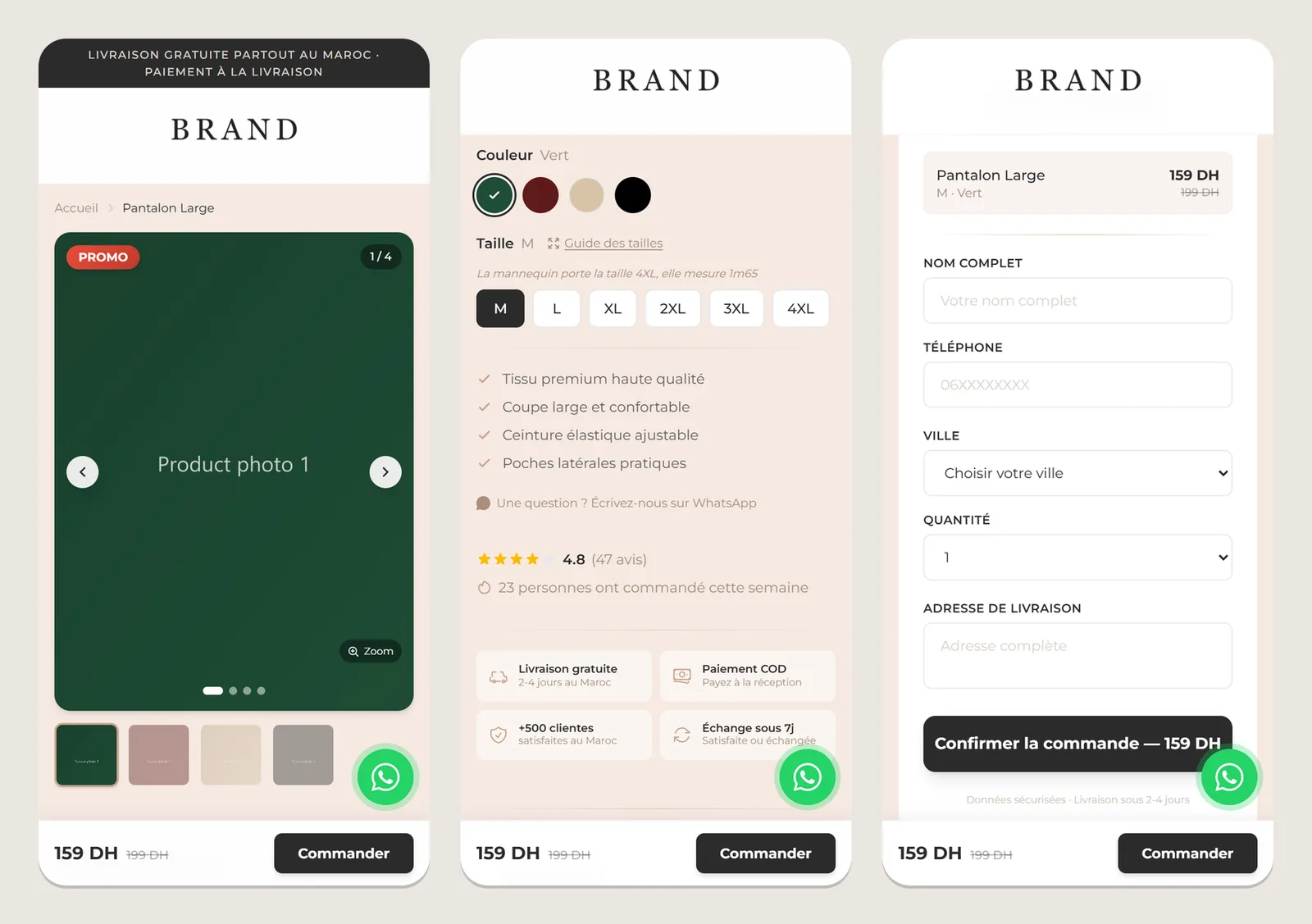
What a cash on delivery landing page has to do
- Load fast on a phone, because almost all traffic comes from ads opened in the Instagram or Facebook app.
- Answer the buyer’s questions before they leave: photos, price and discount, sizes with a size guide, colours, delivery and payment on arrival.
- Take the order in one short form: name, phone, city, address, size, colour, quantity. No account, no card.
- Tell the ad platform about every order, so the campaigns optimise for buyers, not just clicks.
- Give a way to ask a question right now, which in this market means WhatsApp.
Step 1: One file per product
The core idea is that a product page is data, not code. Each product is a small configuration file; adding a product means copying one, changing the values and adding the photos:
export default {
  slug: "mon-nouveau-produit",          // becomes the page URL
  name: "Mon Nouveau Produit",
  price: 199,                           // in MAD
  oldPrice: 249,                        // optional: shows the discount
  images: ["/images/mon-nouveau-produit/1.jpg", "/images/mon-nouveau-produit/2.jpg"],
  colors: [{ name: "Noir", hex: "#000000" }, { name: "Blanc", hex: "#FFFFFF" }],
  sizes: ["S", "M", "L", "XL"],
  description: "وصف المنتج بالعربية",     // Arabic, rendered right-to-left
  descriptionFr: "Description du produit en français.",
  whatsappNumber: "212600000000",
  metaPixelId: null,                    // null: use the brand's global pixel
};
A dynamic route, app/[slug]/page.js, renders any product from its file. The page is generated by Next.js from the same reusable components every time: gallery, product information, size guide, social proof, trust badges, order form, a sticky “order” bar and a WhatsApp button. A new product gets every improvement made to those components for free.
Step 2: A page built for buyers on phones
- A sticky order bar stays at the bottom of the screen while the visitor scrolls the photos, so the call to action is always one tap away.
- Trust signals next to the form: free delivery in 2 to 4 days, payment on delivery, a 7-day exchange, and ratings or customer counts when the brand has them.
- A size guide where people hesitate, because “will it fit?” is the most common reason for a cancelled COD order.
- Bilingual content: the French description and the Arabic one, the latter correctly right-to-left.
- Product structured data (JSON-LD), so search engines and link previews understand price and availability.
Step 3: An order API that resists junk
A public order form attracts fake and malformed orders, and every fake order costs a delivery attempt. The API route validates everything on the server, whatever the browser sent:
function isValidPhone(phone) {
  const cleaned = phone.replace(/\s/g, "");
  return /^(0[5-7]\d{8}|\+212[5-7]\d{8})$/.test(cleaned);   // Moroccan mobile and landline formats
}

function sanitize(val, maxLen) {
  if (typeof val !== "string") return null;
  return val.trim().slice(0, maxLen);
}

// Simple in-memory rate limit: at most 5 orders per IP per minute
const rateMap = new Map();
function isRateLimited(ip) {
  const now = Date.now();
  const entry = rateMap.get(ip);
  if (!entry || now - entry.start > 60_000) { rateMap.set(ip, { start: now, count: 1 }); return false; }
  entry.count++;
  return entry.count > 5;
}
Every field is trimmed and length-limited, required fields are checked, the phone number must be a valid Moroccan number, and one connection cannot flood the form. Error messages are written in French for the customer, not in developer language.
Step 4: Orders stored where the team can use them
The first version saved orders to a JSON file, which is fine on a single server but disappears on platforms with temporary file systems such as Vercel. Orders now go to PostgreSQL through a small connection pool, and the storage is isolated in one function, saveOrder(), so moving to Google Sheets, Airtable or a delivery company’s API means changing one place.
import { Pool } from "pg";

const pool = new Pool({
  connectionString: process.env.DATABASE_URL,
  max: 10,
  idleTimeoutMillis: 30_000,
  connectionTimeoutMillis: 5_000,
});
Step 5: Tracking every purchase for the ads
When an order is accepted, the page sends a custom COD_Order event with the order value and currency to the Meta Pixel, which the ads account uses as its conversion, and Google Tag Manager is loaded for everything else. A custom event keeps cash-on-delivery orders separate from paid online purchases, which matters because some COD orders are refused at the door. The ad platform then knows which ads produced orders, not only clicks, which is what lets campaigns optimise toward buyers. Each product can use the brand’s global pixel or its own, set in the product file.
export function trackCODOrder(value, currency = "MAD") {
  if (typeof window !== "undefined" && window.fbq) {
    window.fbq("trackCustom", "COD_Order", { value, currency });
  }
}
What made the system work for a small team
- Content as configuration. The team launches a product with a file and a folder of photos.
- Validation on the server. The browser’s checks are a convenience; the API’s checks are the protection.
- Storage behind one function. The business could start simple and move to a database without rewriting the pages.
- Measure the sale, not the click. Without the purchase event, ad money is spent blind.
Selling through ads and WhatsApp?
If your orders arrive through Instagram, Facebook and WhatsApp, I can build product pages that convert on phones, collect orders with cash on delivery, track every purchase for your ads, and send orders straight to where your team works: a sheet, a back office, or a structured WhatsApp message. When the volume grows, the same orders can feed stock tracking and delivery status.
Official resources for cash on delivery landing page
Documentation and references for cash on delivery landing page: