This blog has more than 800 articles, a custom theme and one person behind it. Keeping it healthy by hand would be a full-time job: checking that pages load, reading Search Console, deleting spam, updating old posts. Instead, four agents built with WordPress automation with n8n do the routine work, and I approve the decisions that matter. This article explains the whole setup, with the patterns you can reuse for your own site or product.
The setup at a glance
| Agent | When | What it does on its own | What it asks me first |
|---|---|---|---|
| Health monitor | Every 15 minutes + 07:00 daily | Checks key pages, ads.txt, sitemap and feed; a daily report with PageSpeed, updates, SSL, disk, PHP errors | Nothing: it only reports |
| Search performance | Mondays | Finds posts Google shows often but people rarely click, drafts better titles and descriptions | Every change |
| Comments | Daily | Moves spam to the Spam folder, drafts replies to real readers | Every reply |
| Content updater | Wednesdays | Picks posts close to the top of Google or losing traffic and drafts improved versions | Every update |
The stack: WordPress with a custom PHP theme, n8n self-hosted, Google Search Console and PageSpeed Insights APIs, Claude Haiku through OpenRouter for the language tasks, and plain SMTP for email.
The design rule: agents propose, people approve
Automating everything is easy; trusting it is not. I split each job into two kinds of action:
- Safe and reversible: checking, measuring, moving spam to a folder it can be restored from. Agents do these alone.
- Visible to readers or Google: titles, descriptions, article text, replies. Agents write a proposal, WordPress stores it, and I approve, edit or reject it on a review page. Approving keeps the previous version so it can be reverted.
That rule decides the architecture: the theme stores proposals and exposes review pages, and n8n does the thinking and scheduling.
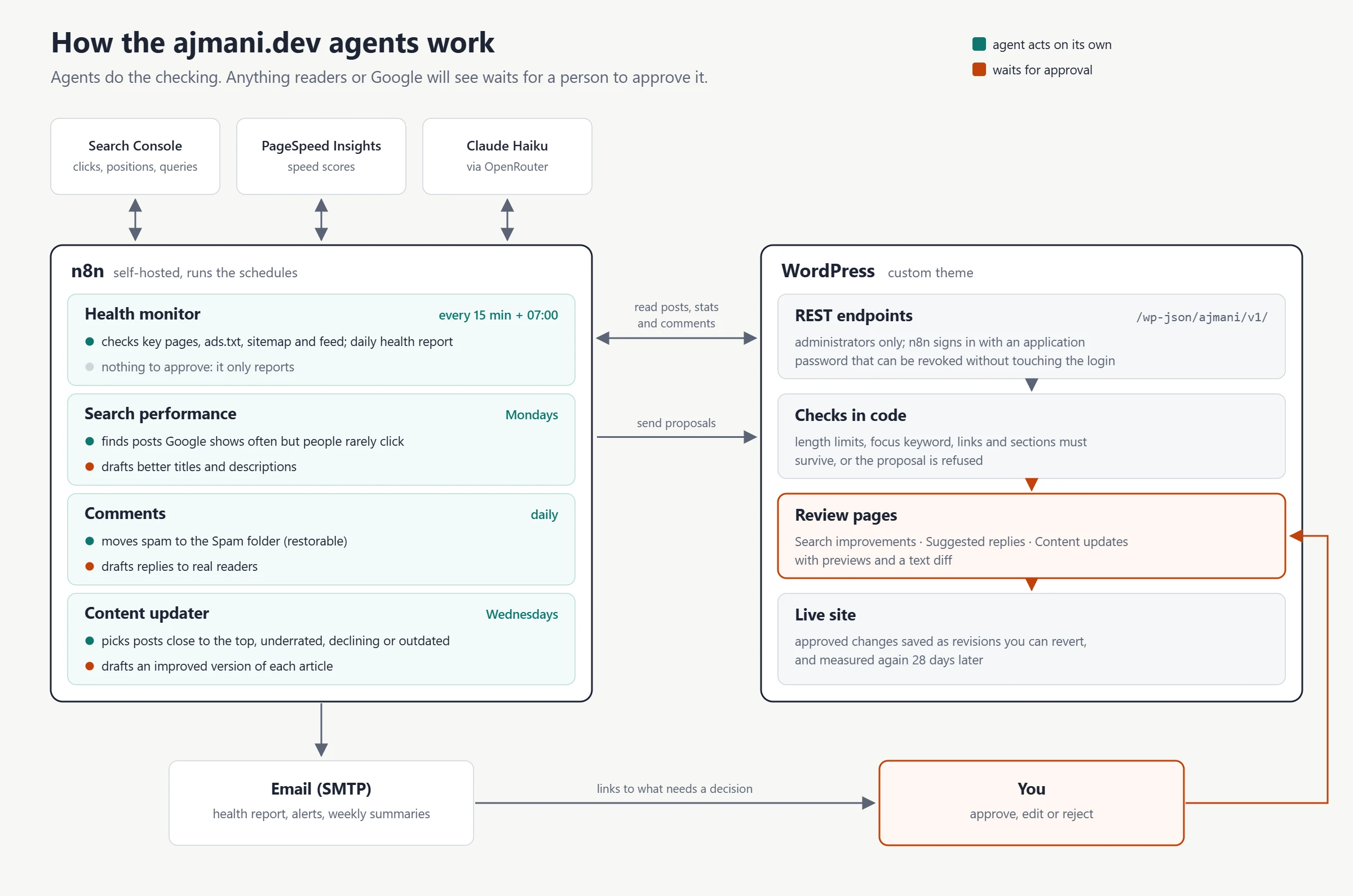
WordPress automation with n8n: how the agents reach WordPress
Each agent uses a small set of custom REST endpoints in the theme, under /wp-json/ajmani/v1/, protected so only an administrator account can call them. n8n authenticates with a WordPress application password, which can be revoked without touching the main login.
register_rest_route( 'ajmani/v1', '/health', array(
    'methods'             => 'GET',
    'callback'            => 'ajmani_ma_health_report',
    'permission_callback' => function () {
        return current_user_can( 'manage_options' );   // administrators only
    },
) );
A practical detail that cost me a debugging session: when a WordPress endpoint returns a JSON list, n8n splits it into separate items, and an empty list produces no items at all, which silently stops the workflow. The endpoints return objects instead ({"posts": [...]}), so an empty result is still one item the next node can handle.
Agent 1: the health monitor
Every 15 minutes it fetches the homepage, an article, the About page, ads.txt, the sitemap and the RSS feed. A page counts as broken if it does not answer, returns an error, shows WordPress’s “critical error” page, or loads without a piece of text that a healthy page always contains. That last check catches the silent failures a status code misses.
To avoid an email every 15 minutes during an outage, the workflow remembers the previous state in n8n’s workflow storage and only sends a message when something goes down or comes back.
Every morning it also reads a private health endpoint in the theme and sends one report: pending plugin and core updates, comments waiting, days since the last post, SEO gaps, SSL days left (read from the live certificate), disk usage, overdue scheduled tasks, PHP fatal errors from the log, plus PageSpeed scores for the homepage and the latest article and a check of 15 random articles.
Agent 2: search performance
Every Monday it compares each post’s click-through rate in Search Console with what its average position normally gets. A page at position 6 with a 0.3% click rate is losing clicks it already earned, usually because the title does not match what people searched for. For the posts losing the most clicks, the agent sends Claude the article, its section headings, the actual search queries and the current title, and asks for a better title and description.
Every proposal goes through checks in code before it is saved: length limits, and the post’s SEO focus keyword must appear in both the title and the description. Proposals that fail are dropped and listed in the email. Approved changes are measured again 28 days later, so the review page shows click-through rate before and after each change.
Agent 3: comments
Spam is handled in two layers. The cheap layer runs in the theme when the comment is submitted: a hidden honeypot field and a minimum fill-in time stop most bots, and rules move obvious spam (URL shorteners, several links, adult or casino phrases, random-letter names, links whose visible text hides their destination) straight to the Spam folder. On its first run this cleared a backlog of 133 waiting comments down to 2.
Whatever the rules let through goes to the daily agent, which classifies each comment as spam, genuine or unsure. One lesson from building it: I first sent the model the comment text with the HTML removed, and it called a spam comment “genuine” because the link to an unrelated site was hidden behind the words “git-native”. Now the model also receives the real destination of every link, and a rule catches disguised links before the model is even asked.
For genuine comments the agent drafts a short reply in my voice. Replies wait in a review page; nothing is posted automatically, and a draft that contains a link is never offered.
Agent 4: the content updater
Every Wednesday it picks up to three posts, rotating between four kinds of opportunity:
- Close to the top: positions 5 to 20 with real impressions, where an improved article can reach the top three.
- Underrated: many impressions but a position between 20 and 80, meaning Google tests the page for large searches but does not rate it yet.
- Declining: impressions, clicks or position dropping compared with the previous 28 days.
- Outdated: a past year in the title.
For each one, the model receives the full article and the real search queries, with strict rules: keep every heading and link, never invent version numbers, prices or statistics, answer the main question early, and for “X vs Y” searches add a comparison table and a verdict. WordPress then refuses any draft that is shorter than the original, drops an internal link, loses the focus keyword or loses sections. The review page shows a preview and a text diff; approving saves a normal WordPress revision.
The parts that are not AI
Several of the biggest improvements were plain engineering in the theme, and they made the agents more effective:
- Speed: self-hosted fonts, a minified stylesheet, inlined scripts and browser caching took the mobile first paint from 3.5 to about 0.9 seconds.
- Internal links: a tool that links sentences already mentioning another post’s keyword, with limits per post, added 222 relevant links across 172 posts.
- Technical SEO: http redirected to https, comment feeds no longer offered to search engines, duplicate posts merged with redirects, and share images generated for every post.
What I would reuse on any site
- Let agents do the checking, not the deciding. A daily report and reviewable proposals give most of the time savings with none of the risk.
- Validate model output in code. Length, required keywords, preserved links: rules a program can check should never be left to a prompt.
- Measure after every change. Before/after numbers turn “the AI improved my titles” into something you can verify.
- Alert on state changes only. A monitor that emails every 15 minutes is a monitor people learn to ignore.
Want this for your site?
The same agents work for any WordPress site, online shop or content-heavy business: uptime and health reports, Search Console-driven improvements, comment and form spam handling, and content refreshes that someone approves. I can set them up on your own n8n (or host one for you), adapt them to your tools and train your team on the review pages.
Official resources for WordPress automation with n8n
Documentation and references for WordPress automation with n8n: